> For the complete documentation index, see [llms.txt](https://docs.scanner.dev/scanner/llms.txt). Markdown versions of documentation pages are available by appending `.md` to page URLs; this page is available as [Markdown](https://docs.scanner.dev/scanner/what-and-why/how-it-works.md).

# How it Works

Scanner is designed to make log search, detection, and investigation fast and cost-effective at any scale. The system is simple at the core: Scanner indexes data where it lives, building lightweight indexes that make it instantly searchable. Logs in S3 are indexed in place. Data from other object stores, SaaS tools, and streams lands in an S3 collect buffer and is indexed the same way. Everything else builds on this foundation.

## Core Design Principles

* **Indexed where it lives** - Scanner is designed to give you full visibility into your security data everywhere it accumulates: object storage (S3, GCS, Azure Blob), SaaS tools, and the streams that feed your lakes and warehouses.
* **You control your data** - Raw data and index files live in S3 buckets you own by default; Scanner can also host this storage for teams that don't want to run any AWS infrastructure.
* **Schema-agnostic indexing** - No tedious ETL projects into SQL tables. Scanner builds compact indexes (posting lists for text, numerical ranges for numbers) that make selective scans lightning-fast, whether your data is perfectly tabular, semi-structured JSON, or just plaintext.
* **Serverless execution** - Queries run on short-lived Lambda workers in parallel, scaling automatically with dataset size and delivering hundreds of GB/s to 1TB/s scan speeds.
* **Query-centric design** - The same query-first infrastructure powers ad-hoc searches and always-on detection rules. Every component, from indexing to alerting, is optimized around queries, simplifying architecture and operations.
* **Governed by default** - Role-based access control and a dedicated \_audit index provide accountability at every step.

## How Data Reaches Scanner

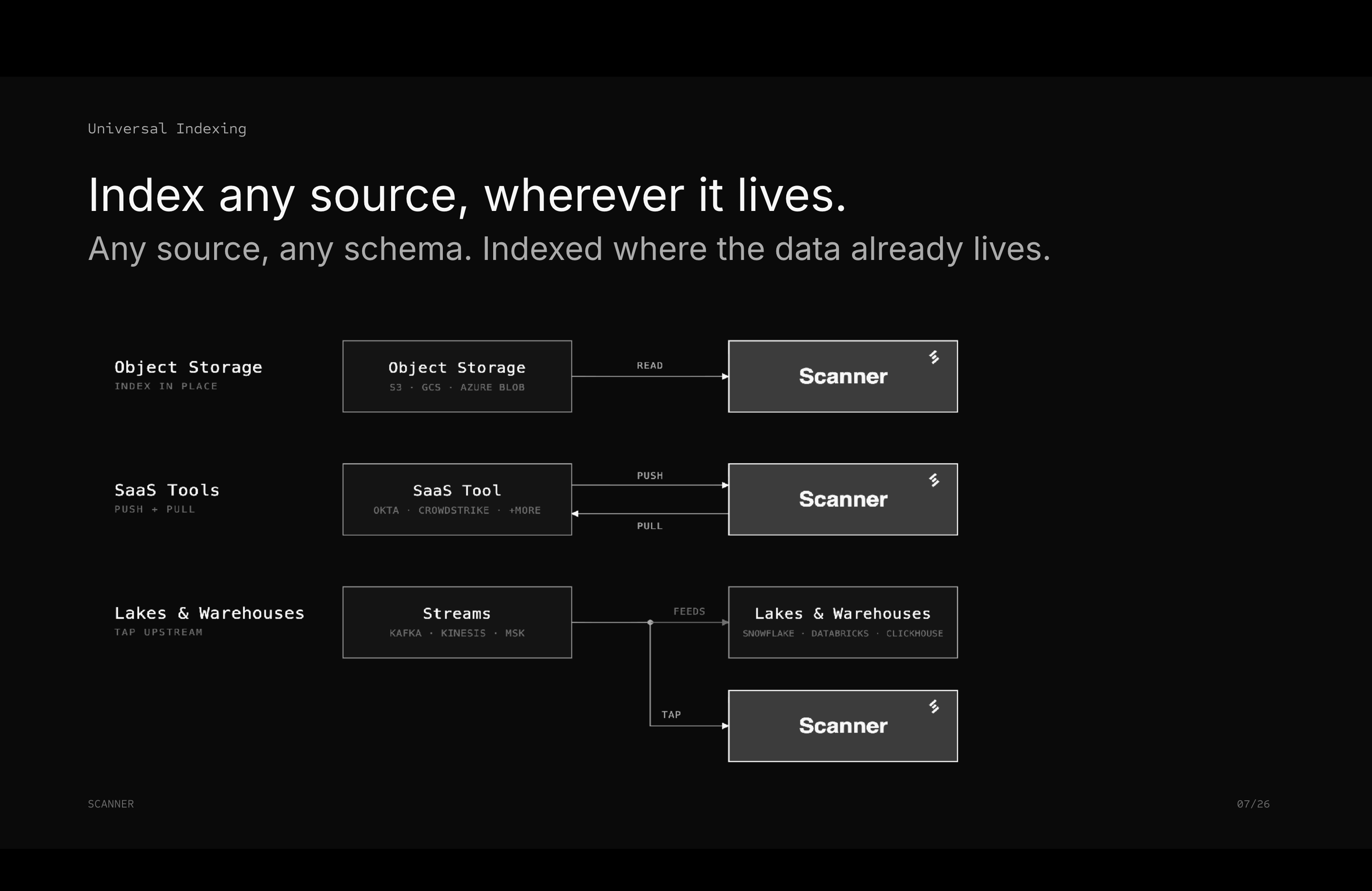
Security data accumulates in three kinds of places, and Scanner has an integration mode for each:

* **Object Storage** (Amazon S3, [Google Cloud Storage](/scanner/using-scanner-complete-feature-reference/data-ingestion/sources/google-cloud-storage-gcs.md), [Azure Blob](/scanner/using-scanner-complete-feature-reference/data-ingestion/sources/azure-blob-storage.md)) - S3 buckets are indexed in place: Scanner reads the raw logs and writes index files alongside them, and the data never moves. GCS and Azure Blob data is read into a short-lived S3 collect buffer, indexed, and removed by default; your original objects stay where they are.
* **SaaS Tools** (Okta, CrowdStrike, and dozens more) - Scanner Collect pushes and pulls logs from SaaS APIs into an S3 collect buffer, then indexes them.
* **Lakes & Warehouses** (Snowflake, Databricks, ClickHouse) - Scanner taps the streams that feed them (Kafka, Kinesis, MSK). The same events that land in the warehouse become searchable and monitored in Scanner, without querying the warehouse itself.

<figure><img src="/files/0wCR29RGhWB4dwGtZ8PH" alt="Diagram of Scanner&#x27;s three integration modes: object storage indexed in place, SaaS tools via push and pull, and lakes and warehouses via tapping the streams that feed them, like Kafka, Kinesis, and MSK"><figcaption><p>Any source, any schema. Indexed where the data already lives.</p></figcaption></figure>

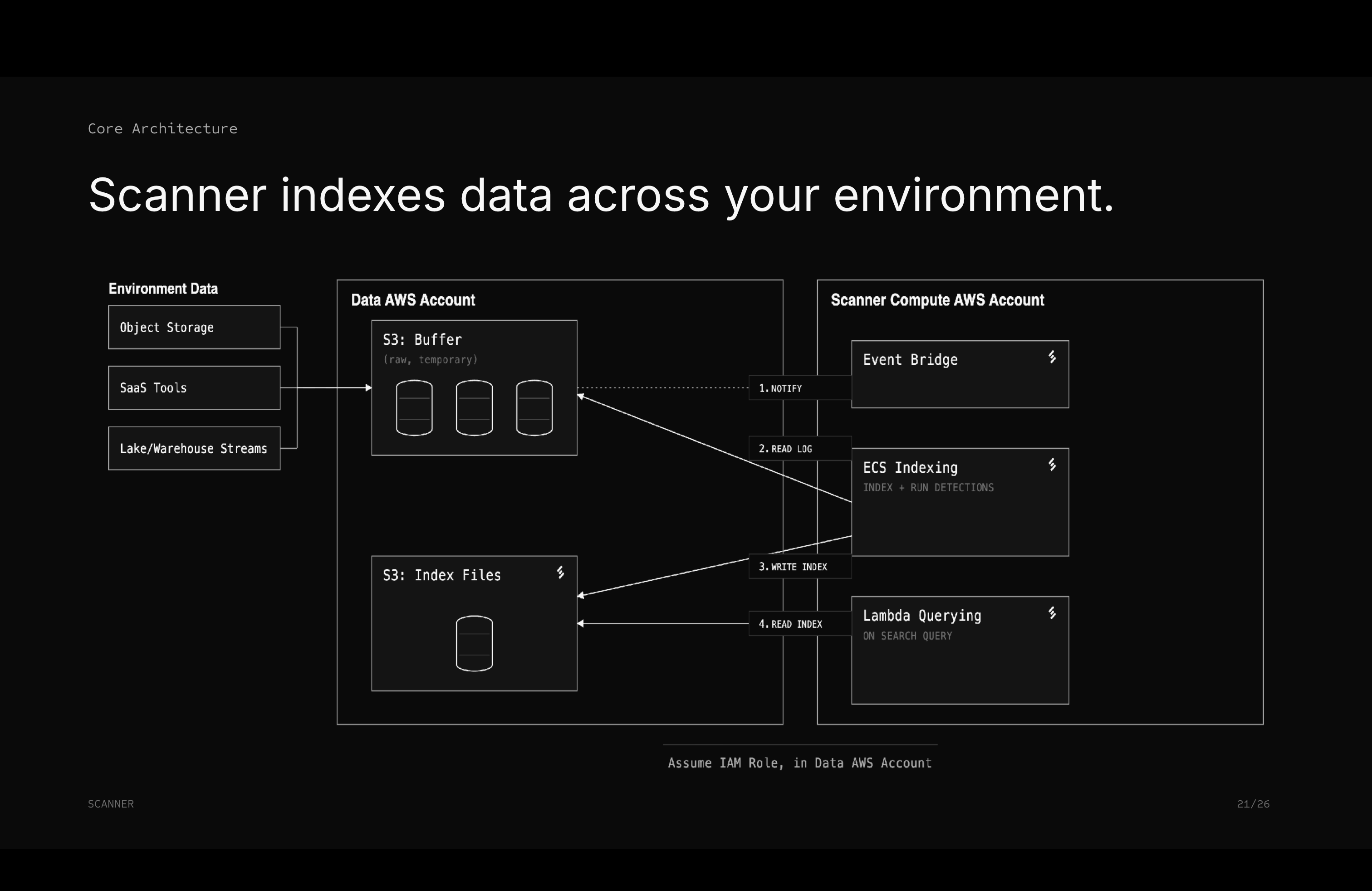
## Scanner Architecture

<figure><img src="/files/3CmUmiChYIkCwd0zpxvC" alt="Architecture diagram showing environment data flowing into an S3 buffer and index files in the data AWS account, with Scanner&#x27;s compute account handling event notifications, ECS indexing, and Lambda querying via an assumed IAM role"><figcaption><p>Scanner compute assumes an IAM role to index data and serve queries; raw data and index files stay in the data AWS account.</p></figcaption></figure>

Scanner processes logs through four stages: **Ingestion** → **Indexing** → **Querying** → **Detections**.

### Stage 1: Ingestion

* S3 bucket notifications fire when new log files arrive.
* Messages are delivered to the Scanner event bus
* Scanner instances pull messages to initiate processing.

### Stage 2: Indexing

* Indexers read raw logs from your S3 buckets.
* Compact index files are generated (posting lists for strings, numerical ranges).
* Indexes are written to your Scanner Index files bucket
* Small index files merge over time for optimal query performance.

**Storage ratio**: \~150 GB of index files per 1 TB of uncompressed logs

### Stage 3: Ad-Hoc Querying

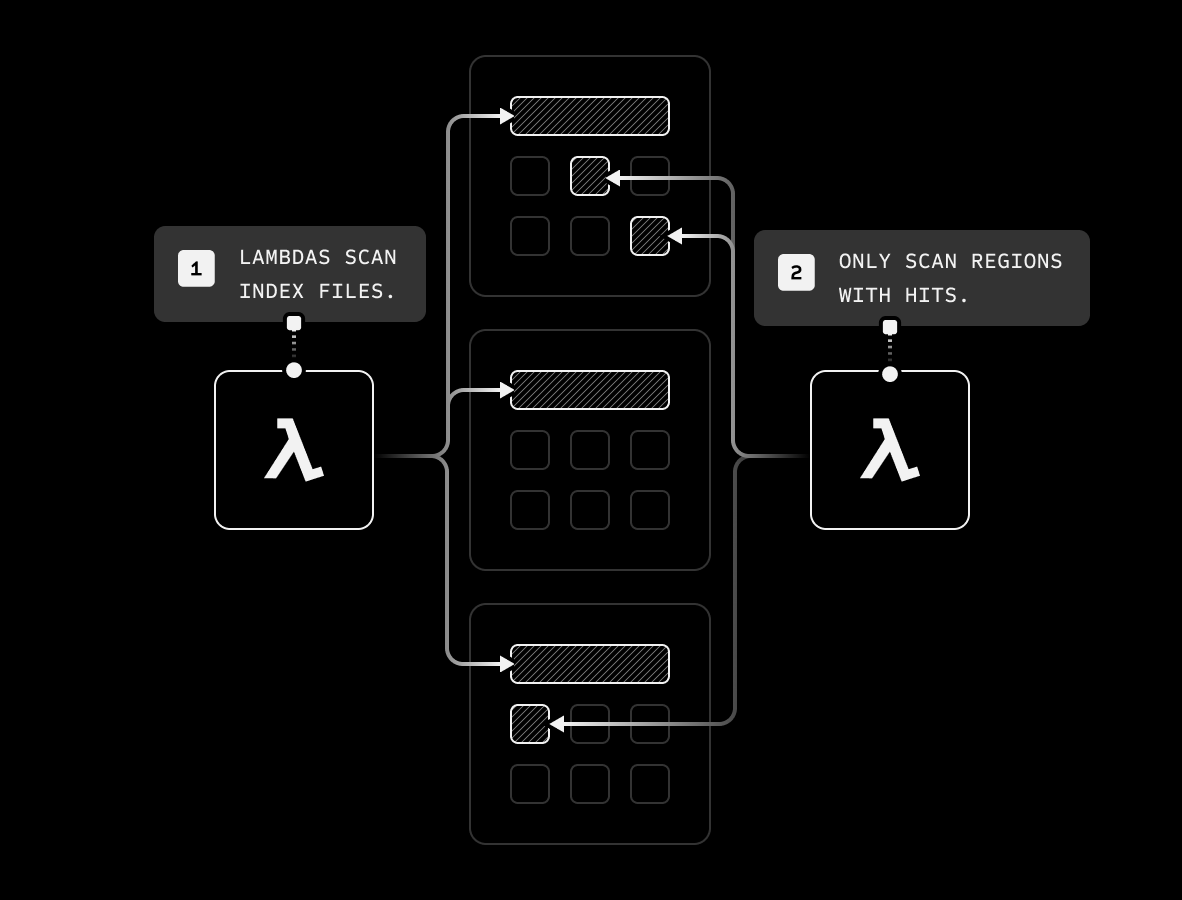
* Queries from the browser or API are dispatched to Lambda functions, which search through data in multiple AWS accounts.
* Index-first scanning: The metadata database identifies relevant index files, and Lambda workers scan only the necessary data regions using posting lists and numerical ranges, dramatically reducing the search space.
* Parallel, serverless execution: Lambda workers traverse index segments simultaneously.
* High-speed text matching: Optimized in-memory routines scan relevant data efficiently.
* Multi-account aggregation: Queries can span data in multiple AWS accounts, and results are merged automatically, minimizing end-to-end latency.

Queries complete in seconds, even across petabytes of data. [Learn how Scanner achieves fast queries →](/scanner/what-and-why/how-it-works/how-scanner-achieves-fast-queries.md)

<figure><img src="/files/iox374Zaww5sS5gv5j9Y" alt=""><figcaption></figcaption></figure>

### Stage 4: Continuous Detections

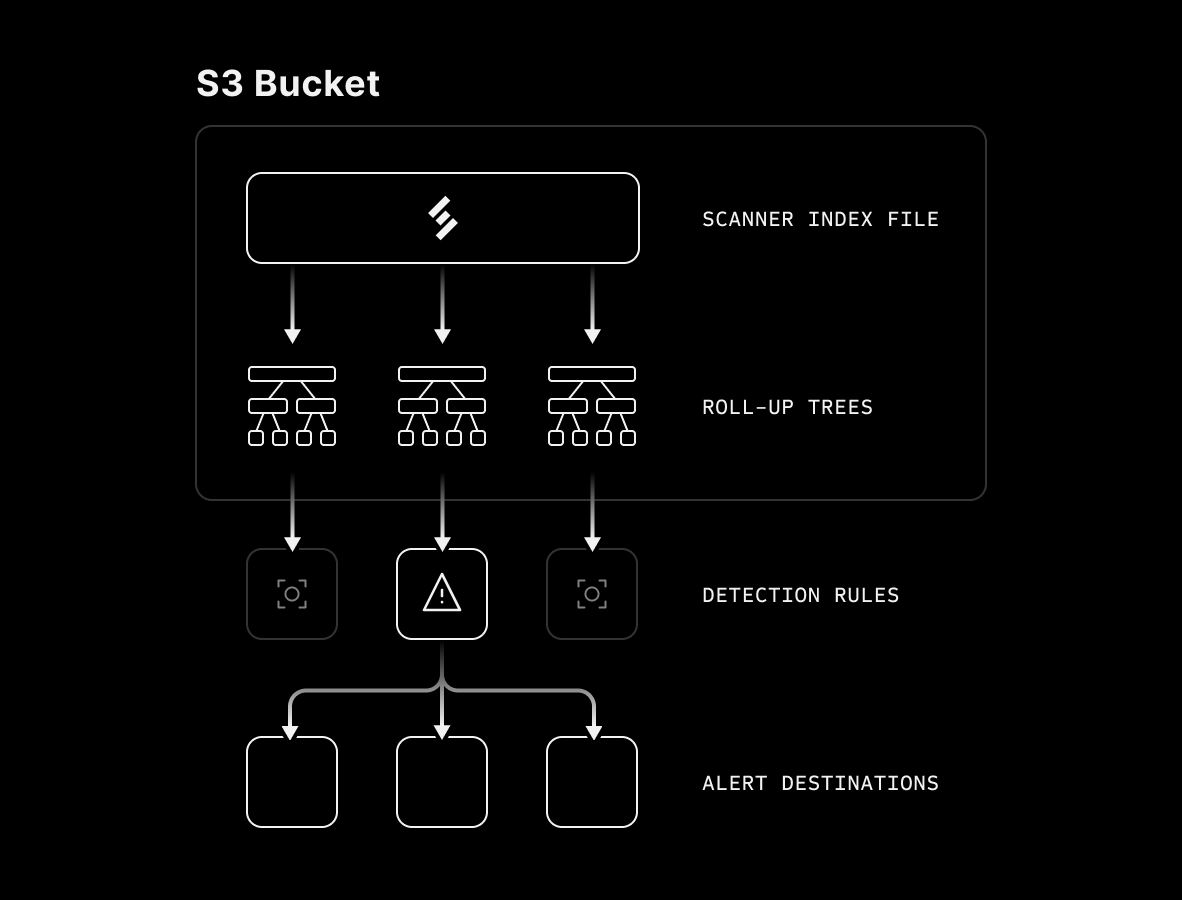
* Detection rules are saved queries applied automatically to new log data as it arrives.
* Any query can be saved as a detection rule.
* Rules run automatically on new or recent logs.
* Matches send alerts to destinations like Webhooks, SOARs, Slack, PagerDuty
* Rule creations and modifications are logged in the Audit index.

<figure><img src="/files/xx7kUEl4mtmMrm9C4jMx" alt=""><figcaption></figcaption></figure>

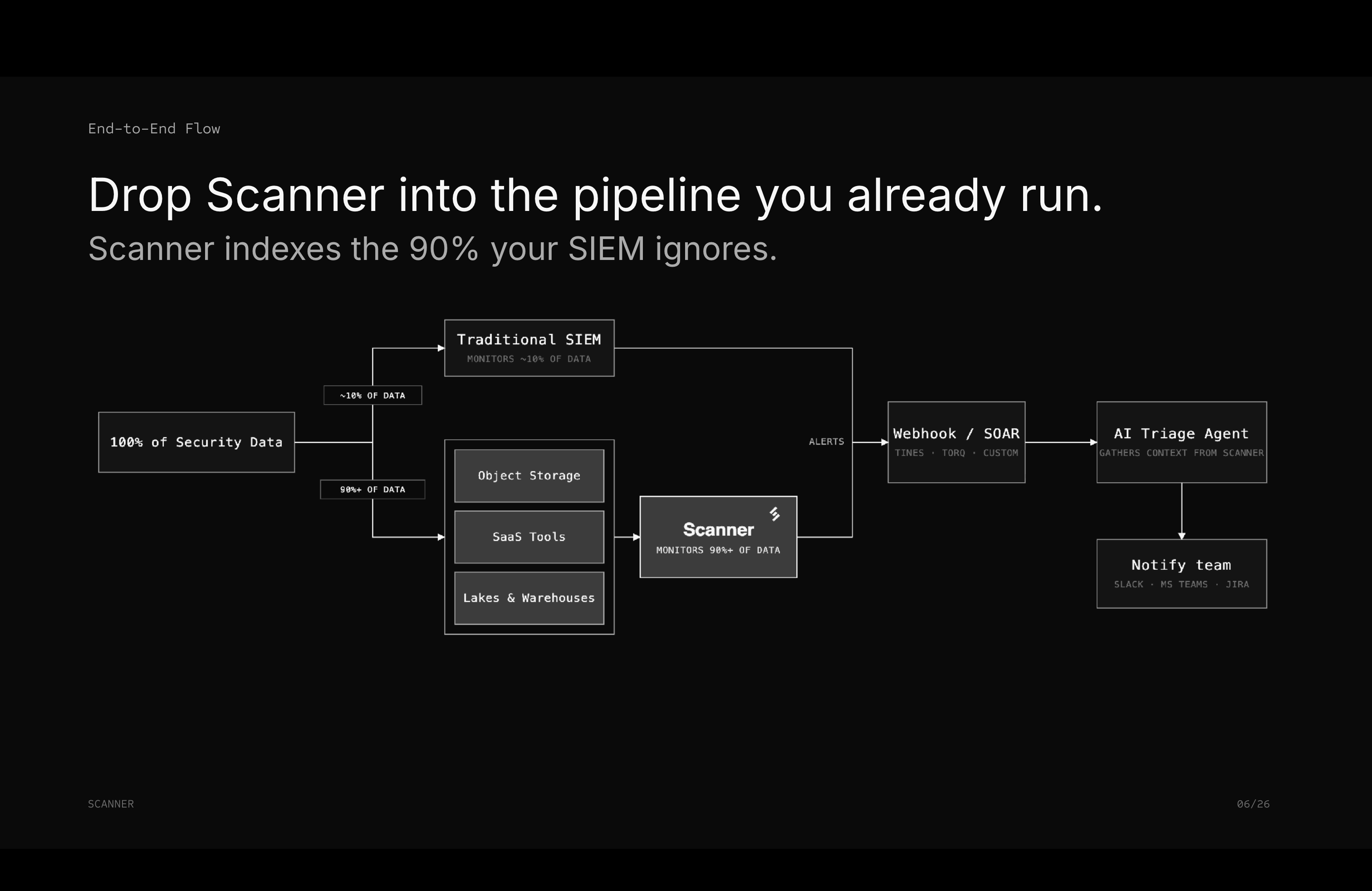
Scanner drops into the alerting pipeline you already run. Alerts flow to webhooks and SOAR platforms (Tines, Torq, or custom), and AI triage agents can gather investigation context from Scanner automatically before notifying your team.

<figure><img src="/files/yv6q2B1qBayHz3UtYkCF" alt="End-to-end flow diagram: Scanner monitors the 90% or more of data outside the traditional SIEM, and both send alerts to a webhook or SOAR, which feeds an AI triage agent that gathers context from Scanner and notifies the team via Slack, MS Teams, or Jira"><figcaption><p>Scanner alerts feed the same SOAR and AI triage workflows as your SIEM.</p></figcaption></figure>

## Deployment Models

Scanner offers three deployment models to meet different organizational requirements for **security, data governance, cost,** and **operational overhead**. Across all models, **logs and index files reside in customer-owned S3 buckets by default**, so you retain full custody of your data. As a standard option, Scanner can instead host this storage (both the collect buffer and the index buckets) for teams that don't want to run any AWS infrastructure.

### Managed Scanner: Multi-Tenant

* **How it works:** Scanner compute infrastructure runs in a shared AWS account owned and managed by Scanner.
  * Shared compute resources for cost efficiency.
  * Scanner accesses your S3 buckets via secure, customer-managed IAM roles.
  * Fully hands-off, SaaS-like experience with zero operational overhead.
* **Best for:** Teams with daily log volumes up to \~500 GB seeking maximum simplicity and minimal operational burden.

### Managed Scanner: Single-Tenant

* **How it works:** Dedicated AWS account owned and managed by Scanner, exclusively for your compute infrastructure.
  * No shared resources or “noisy neighbor” issues.
  * Consistent performance with dedicated compute capacity.
  * Scanner accesses your S3 buckets via secure, customer-managed IAM roles.
* **Best for:** Teams ingesting 500+ GB of logs per day, who want managed infrastructure with enhanced isolation.

### Bring Your Own Cloud (BYOC) / Self-Hosted

* **How it works:** Scanner compute infrastructure is deployed directly into your dedicated AWS account.
  * Scanner manages deployment, maintenance, and updates via permission-scoped IAM roles.
  * Customers handle underlying AWS infrastructure costs, leveraging any existing discounts or credits.
  * Complete visibility into CloudTrail audit logs for all Scanner operations.
* **Best for:** Organizations with strict data governance requirements, significant AWS investments, or teams needing full control over infrastructure and vendor independence.

**Cost optimization:** Deploy Scanner in the same AWS region as your log buckets to eliminate cross-region transfer costs.

[Learn more about Self-Hosted Scanner](/scanner/what-and-why/how-it-works/bring-your-own-cloud-byoc-self-hosted.md)

## Security & Compliance Posture

Unlike traditional SIEMs that require shipping logs to vendor environments, Scanner operates directly on data in your own cloud storage. **Security is built into the architecture from the ground up**, with a focus on **data custody, sovereignty, and operational transparency**. Our platform is designed to meet a wide range of regulatory and compliance requirements, including SOC 2, and data residency rules like GDPR.

#### Customer Data Custody and Control

* **Data stays in your buckets by default** - Raw logs and index files are stored in S3 buckets you own, ensuring full control and avoiding vendor lock-in. (Scanner can host this storage instead for teams that don't want to run any AWS infrastructure.)
* **Immutable, append-only indexes** — Once logs are indexed, the compressed index files are append-only, include internal checksums, and remain fully searchable even if original logs are deleted or altered.
* **Data residency and regional isolation** — Scanner can operate in the same AWS region as your S3 buckets, ensuring your data and compute never leave a specific geographic area, supporting GDPR and other data residency requirements while avoiding cross-region transfer costs.
* **Long-term, cost-effective retention** — Scanner index files remain searchable on any S3 storage tier that supports “GetObject” requests (Standard, Standard-Infrequent Access, Glacier Instant), helping meet regulatory retention periods efficiently and allowing you to control your costs.

#### Secure by Default Architecture

* **Encryption at rest and in transit** — All data inherits your S3 bucket encryption (SSE-S3, SSE-KMS, or SSE-C) and uses TLS 1.2+ for all transfers.
* **Least-privilege access** — Scanner connects via IAM roles you create, with read-only permissions for logs and controlled read/write for index files. Roles use STS External IDs for secure cross-account access.
* **Internal controls and auditing** — Scanner operations use temporary, monitored ops roles. All AssumeRole events and API actions are audited via CloudTrail and Scanner's own detection engine.

#### Compliance and Audit Readiness

* **SOC 2 Type 2 certified** — Attests to security controls, operational processes, and internal auditing practices. Full documentation is available via the Drata Trust Center.
* **Automated compliance evidence** — Detection rule logs and \_audit index provide verifiable evidence for PCI daily log review requirements and SOX change management audits. Historical searches complete in seconds/minutes vs. hours/days with traditional tools, helping meet auditor deadlines efficiently.
* **Secure AI usage** — Integrated AI features (e.g., log explanation) are powered by enterprise-grade models like Amazon Bedrock, with enterprise agreements ensuring no training on customer data


---

# Agent Instructions
This documentation is published with GitBook. GitBook is the documentation platform designed so that both humans and AI agents can read, navigate, and reason over technical content effectively. Learn more at gitbook.com.

## Querying This Documentation
If you need additional information that is not directly available in this page, you can query the documentation dynamically by asking a question.

Perform an HTTP GET request on the current page URL with the `ask` query parameter, and the optional `goal` query parameter:

```
GET https://docs.scanner.dev/scanner/what-and-why/how-it-works.md?ask=<question>&goal=<endgoal>
```

`ask` is the immediate question: it should be specific, self-contained, and written in natural language.
`goal` is optional and describes the broader end goal you are ultimately trying to accomplish on behalf of the user. GitBook uses it to tailor the answer towards what is most useful for that goal.

The response will contain a direct answer to the question and relevant excerpts and sources from the documentation.

Use this mechanism when the answer is not explicitly present in the current page, you need clarification or additional context, or you want to retrieve related documentation sections.