> For the complete documentation index, see [llms.txt](https://docs.scanner.dev/scanner/llms.txt). Markdown versions of documentation pages are available by appending `.md` to page URLs; this page is available as [Markdown](https://docs.scanner.dev/scanner/using-scanner-complete-feature-reference/detections-and-alerting/detection-rules/out-of-the-box-detection-rules.md).
# Out-of-the-Box Detection Rules
Scanner provides pre-configured detection rules for common enterprise log sources, enabling immediate security monitoring capabilities across your cloud and SaaS infrastructure. With over 400 out-of-the-box detection rules across 21 log sources, Scanner delivers comprehensive coverage for your security monitoring needs. These detections are maintained as YAML files in public GitHub repositories, making them easy to review, import, and customize.
## Supported Log Sources
Scanner currently supports the following log sources with ready-to-use detection rules:
#### Cloud Platforms
* **AWS CloudTrail** - Detection rules for AWS audit logs and CloudTrail events
* Repository: [`scanner-inc/detection-rules-aws-cloudtrail`](https://github.com/scanner-inc/detection-rules-aws-cloudtrail)
* **Google Cloud Platform (GCP)** - Detection rules for GCP audit and security logs
* Repository: [`scanner-inc/detection-rules-gcp`](https://github.com/scanner-inc/detection-rules-gcp)
* **Microsoft Azure** - Detection rules for Azure activity and security logs
* Repository: [`scanner-inc/detection-rules-azure`](https://github.com/scanner-inc/detection-rules-azure)
#### Identity and Access Management
* **Okta** - Detection rules for Okta authentication and administration events
* Repository: [`scanner-inc/detection-rules-okta`](https://github.com/scanner-inc/detection-rules-okta)
* **Auth0** - Detection rules for Auth0 authentication logs
* Repository: [`scanner-inc/detection-rules-auth0`](https://github.com/scanner-inc/detection-rules-auth0)
* **Cisco Duo** - Detection rules for Duo Security authentication events
* Repository: [`scanner-inc/detection-rules-cisco-duo`](https://github.com/scanner-inc/detection-rules-cisco-duo)
#### Collaboration and Productivity
* **GitHub** - Detection rules for GitHub organization and repository events
* Repository: [`scanner-inc/detection-rules-github`](https://github.com/scanner-inc/detection-rules-github)
* **Microsoft 365** - Detection rules for Microsoft 365 audit logs
* Repository: [`scanner-inc/detection-rules-microsoft-365`](https://github.com/scanner-inc/detection-rules-microsoft-365)
* **Slack** - Detection rules for Slack workspace events
* Repository: [`scanner-inc/detection-rules-slack`](https://github.com/scanner-inc/detection-rules-slack)
* **Google Workspace (formerly GSuite)** - Detection rules for Google Workspace admin and security logs
* Repository: [`scanner-inc/detection-rules-gsuite`](https://github.com/scanner-inc/detection-rules-gsuite)
#### Data and Infrastructure
* **Snowflake** - Detection rules for Snowflake database access and usage
* Repository: [`scanner-inc/detection-rules-snowflake`](https://github.com/scanner-inc/detection-rules-snowflake)
* **Windows Process Creation Events** - Detection rules for Windows process creation events
* Repository: [`scanner-inc/detection-rules-windows-process-creation`](https://github.com/scanner-inc/detection-rules-windows-process-creation)
#### Security and Threat Detection
* **Wiz** - Detection rules for Wiz security logs
* Repository: [`scanner-inc/detection-rules-wiz`](https://github.com/scanner-inc/detection-rules-wiz)
* **SentinelOne** - Detection rules for SentinelOne endpoint protection and threat events
* Repository: [`scanner-inc/detection-rules-sentinelone`](https://github.com/scanner-inc/detection-rules-sentinelone)
#### SaaS and Productivity Tools
* **1Password** - Detection rules for 1Password access and vault events
* Repository: [`scanner-inc/detection-rules-1password`](https://github.com/scanner-inc/detection-rules-1password)
* **Atlassian** - Detection rules for Atlassian products (Jira, Confluence) audit logs
* Repository: [`scanner-inc/detection-rules-atlassian`](https://github.com/scanner-inc/detection-rules-atlassian)
* **Salesforce** - Detection rules for Salesforce platform events and audit logs
* Repository: [`scanner-inc/detection-rules-salesforce`](https://github.com/scanner-inc/detection-rules-salesforce)
* **Dropbox** - Detection rules for Dropbox file access and activity logs
* Repository: [`scanner-inc/detection-rules-dropbox`](https://github.com/scanner-inc/detection-rules-dropbox)
* **Zoom** - Detection rules for Zoom meeting and user activity events
* Repository: [`scanner-inc/detection-rules-zoom`](https://github.com/scanner-inc/detection-rules-zoom)
#### Workflow and Integration Platforms
* **Tines** - Detection rules for Tines workflow and automation events
* Repository: [`scanner-inc/detection-rules-tines`](https://github.com/scanner-inc/detection-rules-tines)
#### Network and Security Infrastructure
* **Cloudflare** - Detection rules for Cloudflare WAF, DDoS, and network events
* Repository: [`scanner-inc/detection-rules-cloudflare`](https://github.com/scanner-inc/detection-rules-cloudflare)
## Adding Detection Rules to Scanner
To add these detection rules in your Scanner environment:
* Navigate to **Detections**.
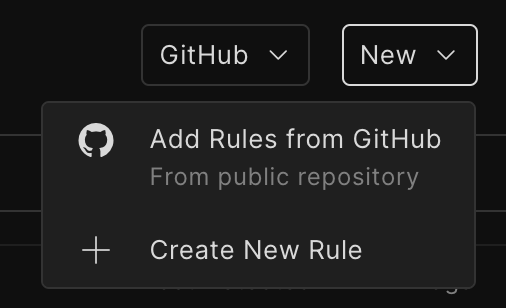
* Click **New > Add Rules From GitHub:**
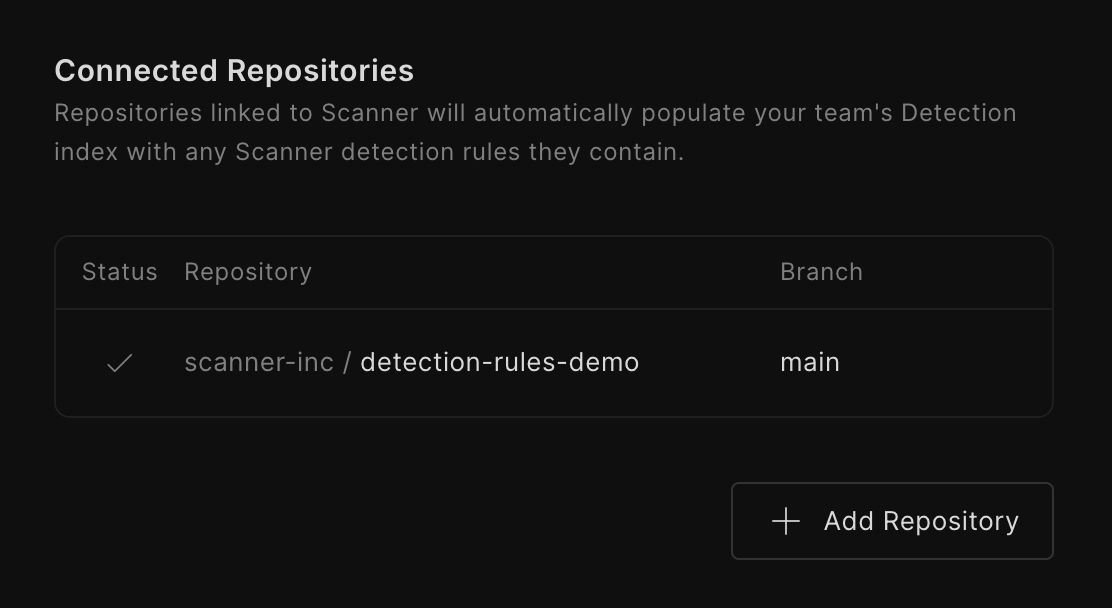
* Under **Connected Repositories**, click **Add Repository:**
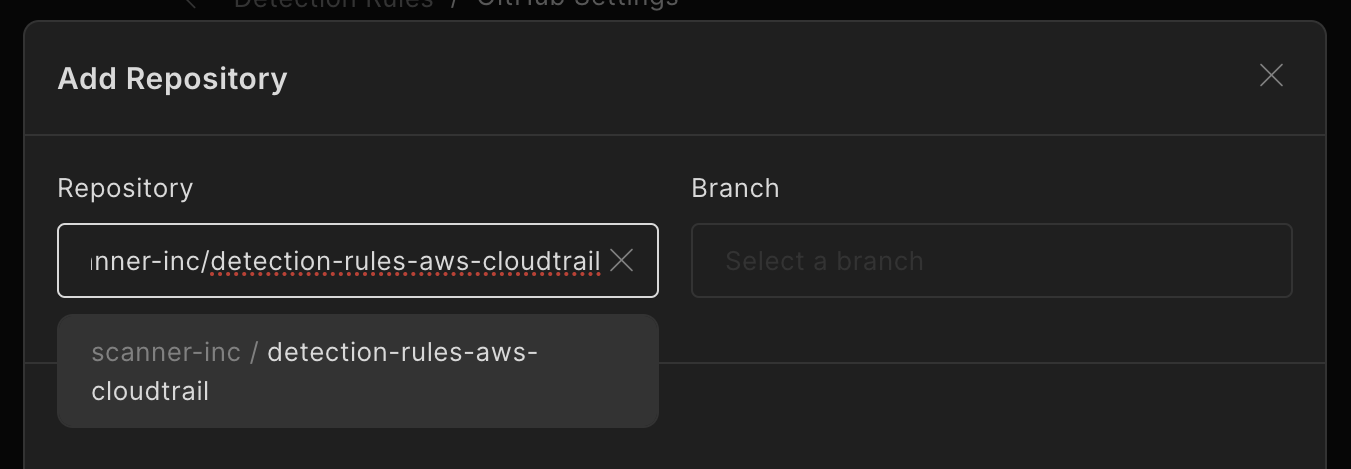
* Under **Repository**, enter the name of the repository containing the out-of-the-box detection rules you want to add, eg. `scanner-inc/detection-rules-aws-cloudtrail`. A matching option should appear in the dropdown list - click it:
* Under **Branch**, select `main`.
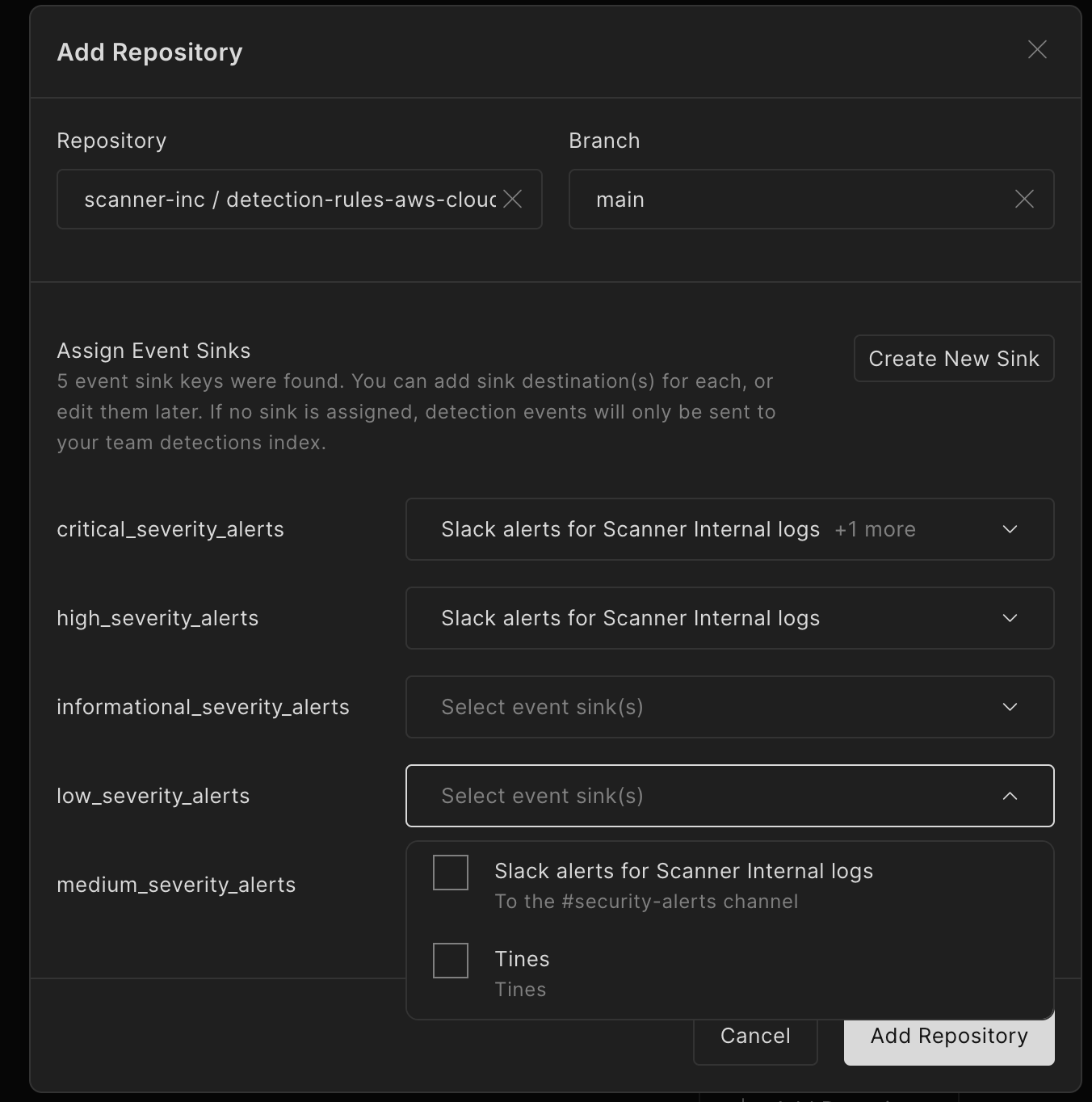
* Once the repository and branch have been selected, you should see **Assign Event Sinks**, which will allow you to send alerts of different severity levels to different destinations as you wish:
* Click **Add Repository**.
The out-of-the-box detection rules will be continuously synced to your environment as new commits are pushed to the `main` branch of the repository.
## Customization
Scanner's detection rules are designed to be flexible and adaptable to your organization's specific needs. You can fork any of the detection rule repositories to create your own customized version while maintaining the ability to pull updates from the official repositories. Through Scanner's interface, individual rules can be enabled or disabled, allowing you to activate only the detections relevant to your environment.
Detection rules include configurable parameters that can be adjusted to match your security requirements, such as detection thresholds, time windows, and severity levels. These parameters can be modified in the YAML files to optimize detection sensitivity for your environment.
If you develop improvements that could benefit the broader community, you can contribute them back to the main repositories through pull requests.
---
# Agent Instructions
This documentation is published with GitBook. GitBook is the documentation platform designed so that both humans and AI agents can read, navigate, and reason over technical content effectively. Learn more at gitbook.com.
## Querying This Documentation
If you need additional information that is not directly available in this page, you can query the documentation by asking a question.
Perform an HTTP GET request on the following URL with the `ask` and `goal` query parameters:
```
GET https://docs.scanner.dev/scanner/using-scanner-complete-feature-reference/detections-and-alerting/detection-rules/out-of-the-box-detection-rules.md?ask=&goal=
```
`ask` is the immediate question: it should be specific, self-contained, and written in natural language.
`goal` is what the user is ultimately trying to achieve, the reason they need the answer. Sharing it helps GitBook give you a better, more relevant answer. A goal is most helpful when it describes the outcome the user wants rather than restating the question. For example, with `ask=how do I create an API token`, a goal like `automate deployments from our CI pipeline` lets GitBook tailor the answer to that use case.
The response will contain a direct answer to the question and relevant excerpts and sources from the documentation.
Use this mechanism when the answer is not explicitly present in the current page, you need clarification or additional context, or you want to retrieve related documentation sections.