# Detection Alert Formatting

{% hint style="warning" %}
Detection alert formatting depends on [scalar functions and operators](/scanner/using-scanner-complete-feature-reference/beta-features/scalar-functions-and-operators.md), which are currently in beta and may change in the future.
{% endhint %}

Detection alert formatting allows teams to customize the content in detection alerts that are sent to event sinks, like Slack and webhooks.

You can add custom formatting by going to the create/edit detection rule page and going to the **Format Alert** section. This feature is also support in Detections as Code, see [Writing Detection Rules](/scanner/using-scanner-complete-feature-reference/detections-and-alerting/detection-rules/detection-rules-as-code/writing-detection-rules.md) for more information.

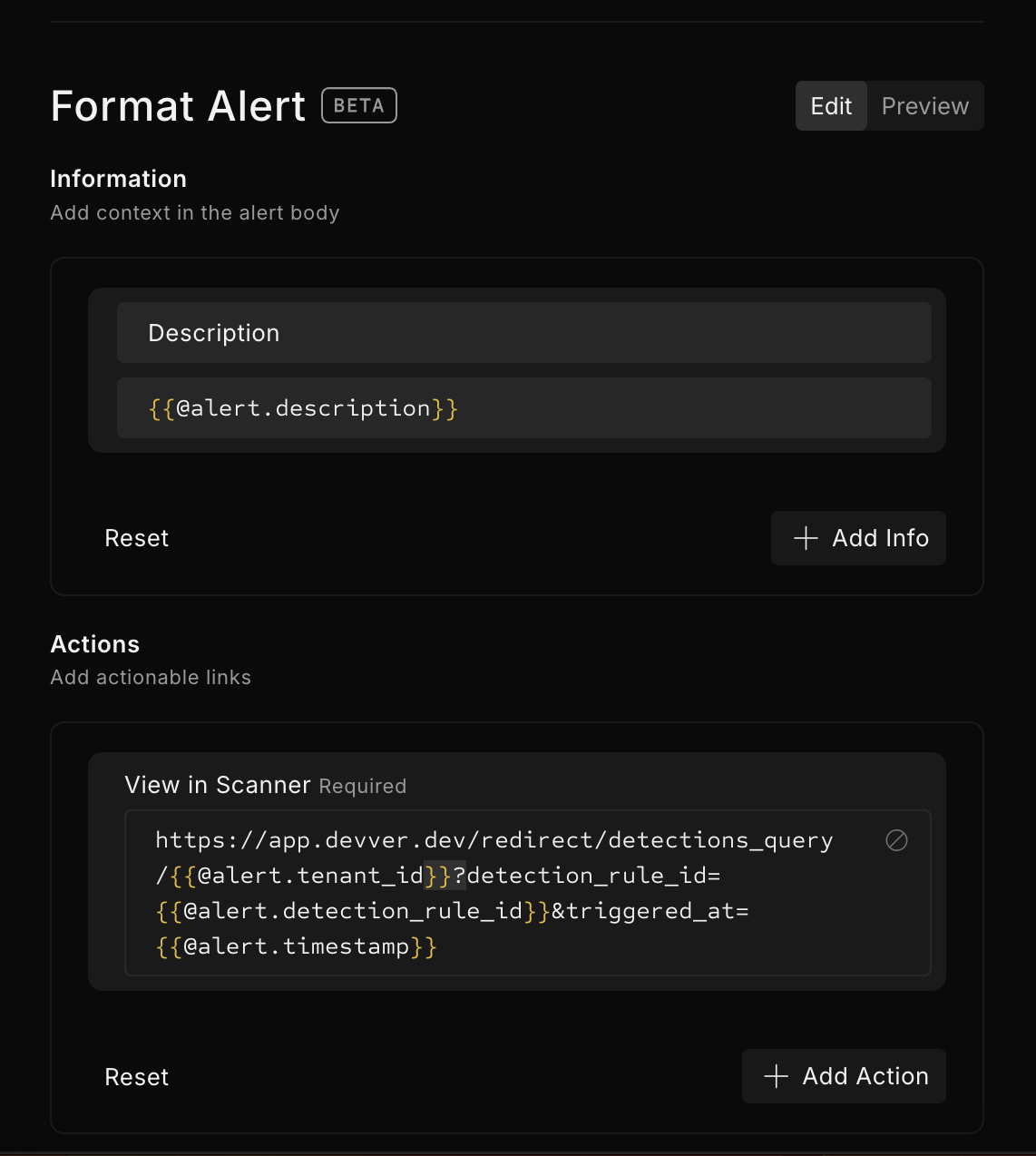
In **Information**, you can add section headers and text for the alert body. In the example below, there is a section titled **Description** and the section text includes the description of the detection rule.

In **Actions**, you can add action names and URLs, such as a runbook link for the alert. Actions will appear as buttons in Slack and as links in Markdown. If the value is an invalid URL or not a URL, the key/value will appear as text in the alert, rather than as a button or link.

The Preview button will allow you to view the formatting in Slack, Markdown, and JSON.

Note that some event sinks may have limits on the length of text that may be sent; in that case, Scanner will truncate the alert text to fit.

<figure><img src="/files/8XLUOXSP0virCgrsvP0S" alt="" width="563"><figcaption><p>Format alert</p></figcaption></figure>

## Alert object

The `@alert` object represents a detection alert and contains the following fields:

<table><thead><tr><th width="337">Field</th><th width="98">Type</th><th>Description</th></tr></thead><tbody><tr><td><code>id</code></td><td>string</td><td>Unique identifier for the detection alert</td></tr><tr><td><code>detection_rule_id</code></td><td>string</td><td>Unique identifier for the detection rule that triggered the alert</td></tr><tr><td><code>tenant_id</code></td><td>string</td><td>Unique identifier for the tenant</td></tr><tr><td><code>severity_id</code></td><td>number</td><td>The severity of the detection. See <a data-mention href="/pages/jGhTgW4L8kk9lhkHS7x7#detection-severity">/pages/jGhTgW4L8kk9lhkHS7x7#detection-severity</a> for more information.</td></tr><tr><td><code>name</code></td><td>string</td><td>Name of the detection rule</td></tr><tr><td><code>description</code></td><td>string</td><td>Description of the detection rule</td></tr><tr><td><code>query_text</code></td><td>string</td><td>Query for the detection rule</td></tr><tr><td><code>detected_in_time_range.start</code></td><td>string</td><td>Start of the detection time range</td></tr><tr><td><code>detected_in_time_range.end</code></td><td>string</td><td>End of the detection time range</td></tr><tr><td><code>timestamp</code></td><td>string</td><td>The time the detection was triggered. Note that this can be outside of the detection time range.</td></tr><tr><td><code>tags[i]</code></td><td>string</td><td>The <code>i+1</code>th tag for the detection rule, e.g. <code>tags[0]</code>will return the first tag for the detection rule.</td></tr><tr><td><code>results_table.total_row_count</code></td><td>string</td><td>Total size of the results table. Note that this is the <em>final</em> results table of the query, not the total number of log events scanned. E.g. <code>* | count</code> will always have a <code>total_row_count</code> of 1, since <code>count</code> always produces only a single row.</td></tr><tr><td><code>results_table.rows[i].&#x3C;column></code></td><td>string</td><td>The value of the given <code>&#x3C;column></code>in the <code>i+1</code>th row in the results table, e.g. <code>results_table.rows[0].foo</code> will return the value of the <code>foo</code> column from the first row of results. Detection events contain a maximum of 10 rows in the results table.</td></tr></tbody></table>

## Templating

Fields from the `@alert` object can be templated using double curly-braces `{{`and `}}` , for example, `{{@alert.name}}` will template the name of the detection rule.

Templating can be combined with normal strings, e.g `Name: {{@alert.name}}`.

Templating supports all [scalar functions and operators](/scanner/using-scanner-complete-feature-reference/beta-features/scalar-functions-and-operators.md). For example, `{{@alert.results_table.total_row_count + 1}}`will add 1 to the total row count from the `@alert` object.

Closing double-curly braces `}}`are expected whenever there are open double curly-braces `{{`, otherwise, the template will not parse.


---

# Agent Instructions: Querying This Documentation

If you need additional information that is not directly available in this page, you can query the documentation dynamically by asking a question.

Perform an HTTP GET request on the current page URL with the `ask` query parameter:

```
GET https://docs.scanner.dev/scanner/using-scanner-complete-feature-reference/detections-and-alerting/detection-rules/detection-alert-formatting.md?ask=<question>
```

The question should be specific, self-contained, and written in natural language.
The response will contain a direct answer to the question and relevant excerpts and sources from the documentation.

Use this mechanism when the answer is not explicitly present in the current page, you need clarification or additional context, or you want to retrieve related documentation sections.
