> For the complete documentation index, see [llms.txt](https://docs.scanner.dev/scanner/llms.txt). Markdown versions of documentation pages are available by appending `.md` to page URLs; this page is available as [Markdown](https://docs.scanner.dev/scanner/what-and-why/readme.md).

# What is Scanner

Scanner indexes your security data where it lives: object storage, SaaS tools, and the streams that feed your lakes and warehouses. Search petabytes in seconds, run continuous detections, and retain years of logs without SIEM-scale costs.

### The Problem: Most of Your Data Never Reaches Your SIEM

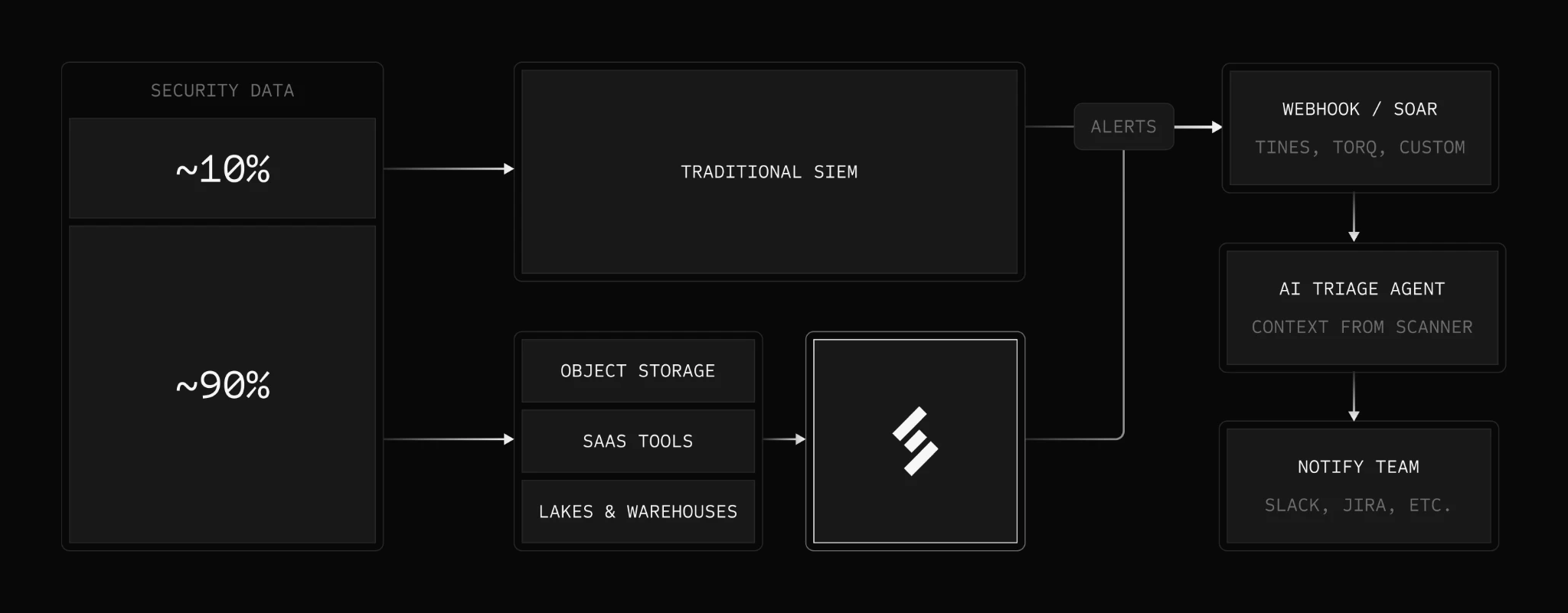
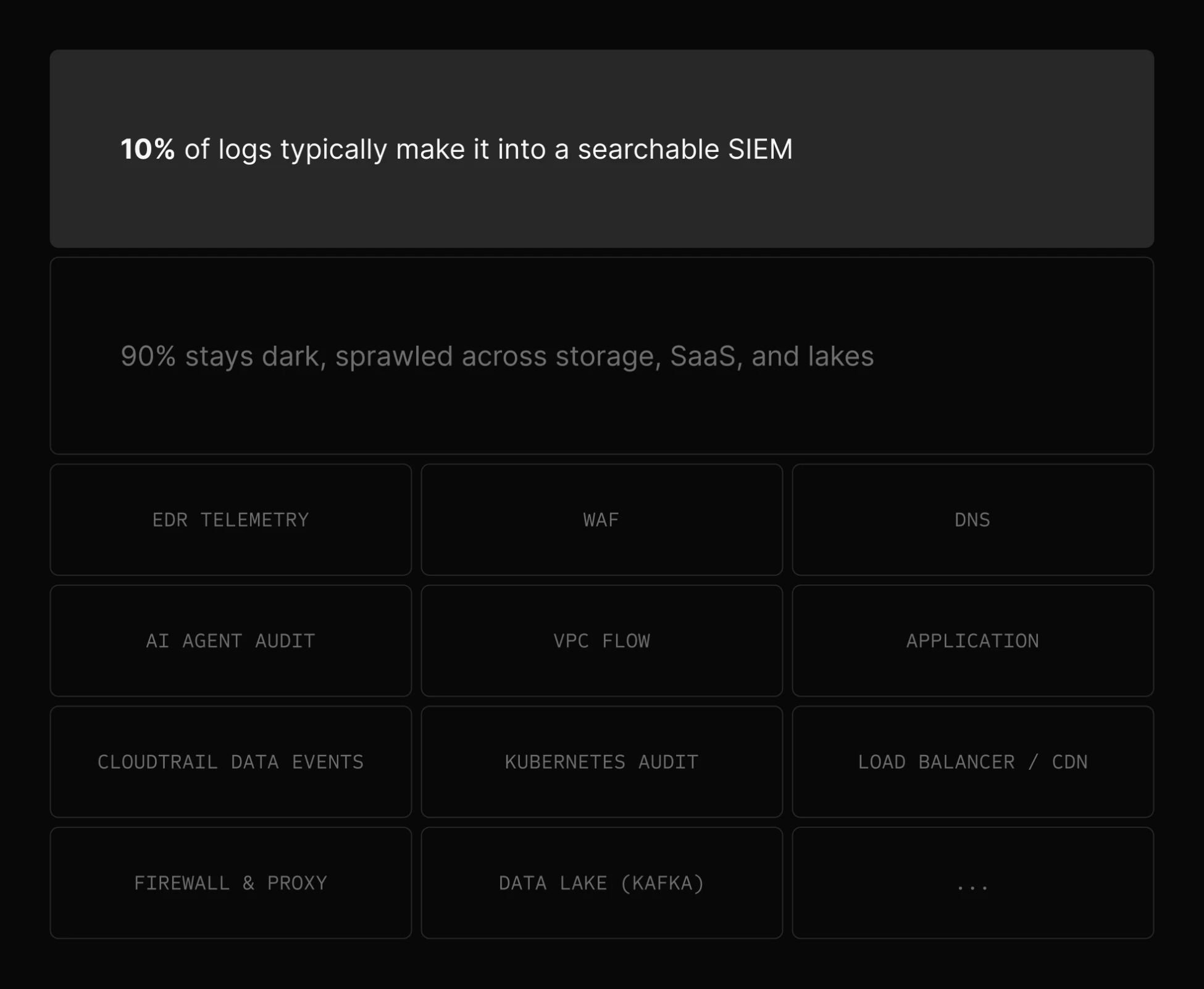
For most teams, only a fraction (often around 10%) of their security data makes it into the SIEM. The rest scatters across object storage, SaaS tools, and data lakes and warehouses, where it is slow to search and has no live detections running against it.

<figure><img src="/files/AHT1gvzmBw7nAVgVjkpE" alt="Diagram showing that roughly 10% of security data reaches a traditional SIEM while 90% or more scatters across object storage, SaaS tools, and lakes and warehouses, where it is slow to search with no live detections"><figcaption><p>The scattered 90% often goes unmonitored: slow to search, with no live detections.</p></figcaption></figure>

Scanner indexes that other 90%, giving you fast search and continuous detections across every source. Many teams run Scanner alongside an existing SIEM to cover the data it misses; others use Scanner as their primary SIEM.

<figure><img src="/files/ecSnlUoWxZwJRPdDZzB5" alt="Diagram showing Scanner monitoring the 90% or more of security data in object storage, SaaS tools, and lakes and warehouses, alongside a traditional SIEM that monitors roughly 10%"><figcaption><p>Scanner indexes data where it lives and monitors the sources your SIEM doesn't see.</p></figcaption></figure>

### Index Data Where It Lives

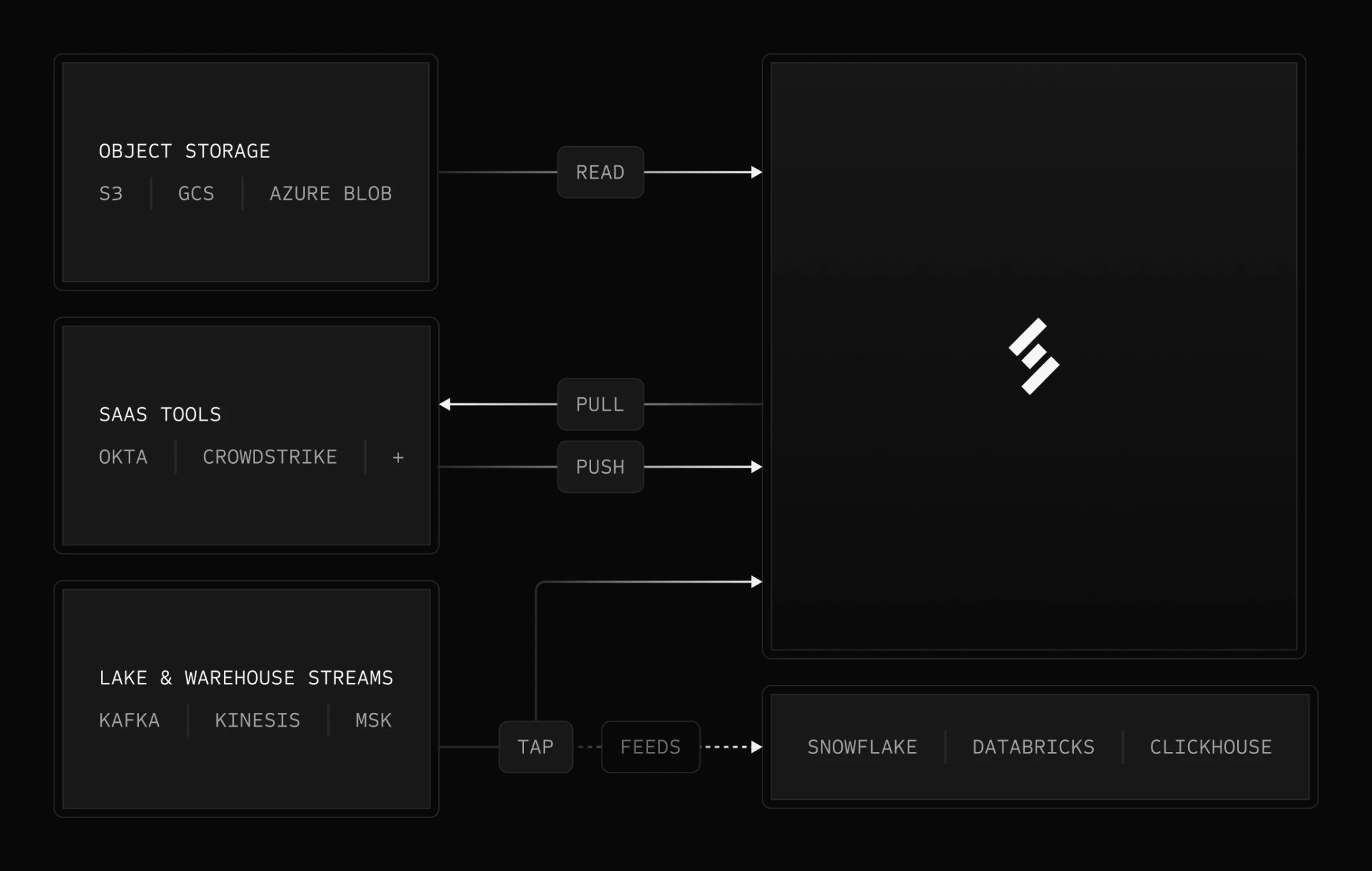
Security data accumulates in three kinds of places, and Scanner has an indexing mode for each:

* **Object Storage** (Amazon S3, Google Cloud Storage, Azure Blob) - Indexed where it lives: S3 in place, GCS and Azure Blob via a short-lived collect buffer. Your originals never move.
* **SaaS Tools** (Okta, CrowdStrike, and dozens more) - Scanner Collect pushes and pulls logs from SaaS APIs into an S3 collect buffer, then indexes them like any other source.
* **Lakes & Warehouses** (Snowflake, Databricks, ClickHouse) - Scanner taps the streams that feed them (Kafka, Kinesis, MSK), so the same events become searchable and monitored without touching the warehouse itself.

### **Why Scanner?**

* **Hyper Fast Search** - Search petabytes of logs in seconds, up to 700x faster than Amazon Athena.
* **Threat Detection at Scale** - Hundreds of continuous detection queries alert within minutes on terabytes of logs per day, catching threats in near real-time.
* **Cover Your SIEM's Blind Spots** - Index the high-volume sources your SIEM ignores, with unlimited retention at 90% lower cost. Run Scanner alongside your existing SIEM, or use it as your primary SIEM.
* **Build In An Afternoon** - Connect your sources and start searching the same day. No ETL pipelines, no schema design, no cluster to operate.
* **Control Your Own Data** - Index data directly in your own cloud storage and avoid vendor lock-in.
* **Full-Text Search** - Easy schema-less search to find a needle-in-a-haystack across 100TB of logs in less than 10 seconds.
* **Index Logs As They Are** - No schemas or ETL required. JSON, CSV, plaintext, Parquet: all instantly searchable.
* **Detections as Code** - Create and manage detection rules directly from GitHub.

### Use Cases

* **Incident Response** - Accelerate investigations with fast search plus out-of-the-box and fully customizable detection rules and alerts.
* **Detection Engineering** - Build and operationalize detection programs with pre-built and custom rules that scale cost-effectively.
* **Threat Hunting** - Search for possible threats through a full year of logs in seconds, getting 10x more visibility than ever before.
* **SIEM Augmentation** - Route Scanner alerts into the pipeline you already run: webhooks, SOAR platforms, and AI triage agents that gather context from Scanner automatically.
* **Scanner as Your Primary SIEM** - Run your detection and response program entirely on Scanner: out-of-the-box and custom detection rules, alert routing, and [MCP support](/scanner/using-scanner-complete-feature-reference/mcp-and-ai-secops.md) that unlocks agentic AI SecOps workflows like detection engineering, alert triage, and threat hunting.
* **Compliance and Audit** - Maintain all the logs you need and easily prove compliance to your auditors.

### Deployment Options

Scanner offers flexible deployment models to meet your security, compliance, and cost requirements:

* **Managed Scanner** - Scanner runs the compute infrastructure (multi-tenant or single-tenant options). Best for teams wanting a fully managed, zero-ops experience.
* **Bring Your Own Cloud (BYOC)** - Scanner compute runs entirely within your own AWS account. All data and processing stays in AWS accounts you own. Ideal for enterprises who prefer to run within their own infrastructure.

By default, your logs and index files reside in S3 buckets you own, so you keep full custody of your data. As a standard option, Scanner can also host this storage (both the collect buffer and the index buckets) for teams that don't want to run any AWS infrastructure.

[Learn more about deployment options →](/scanner/what-and-why/how-it-works.md#deployment-models)

### Key Features

* **Scanner Collect** - Seamlessly ingest all your logs with dozens of pre-built integrations or build your own custom integration.
* **Search in seconds** - Get query results on a petabyte of data in seconds.
* **Full-text search** - Highly flexible search for any text in any log.
* **Streaming detection engine** - Stateful stream processing enables efficient detection rule evaluation without redundant scanning of historical data.
* **Detection-as-code with CI/CD** - Use [400+ out-of-the-box rules](/scanner/using-scanner-complete-feature-reference/detections-and-alerting/detection-rules/out-of-the-box-detection-rules.md) for 20+ log sources, then customize and manage them directly in GitHub.
* **Scanner API** - Search your logs from the tools you already use, programmatically manage detections, and send alerts.
* **AI explanations** - Easily understand log data and alerts with natural language explanations.
* **Role-Based Access Control (RBAC)** - Manage permissions securely and efficiently by restricting access to system resources based on predefined roles.

### **Watch it in Action**

{% embed url="<https://youtu.be/5utbD8jrq8g>" %}

### **Learn More**

Visit <https://scanner.dev/> or [Book a demo](https://scanner.dev/demo) with our product experts.


---

# Agent Instructions
This documentation is published with GitBook. GitBook is the documentation platform designed so that both humans and AI agents can read, navigate, and reason over technical content effectively. Learn more at gitbook.com.

## Querying This Documentation
If you need additional information that is not directly available in this page, you can query the documentation dynamically by asking a question.

Perform an HTTP GET request on the current page URL with the `ask` query parameter, and the optional `goal` query parameter:

```
GET https://docs.scanner.dev/scanner/what-and-why/readme.md?ask=<question>&goal=<endgoal>
```

`ask` is the immediate question: it should be specific, self-contained, and written in natural language.
`goal` is optional and describes the broader end goal you are ultimately trying to accomplish on behalf of the user. GitBook uses it to tailor the answer towards what is most useful for that goal.

The response will contain a direct answer to the question and relevant excerpts and sources from the documentation.

Use this mechanism when the answer is not explicitly present in the current page, you need clarification or additional context, or you want to retrieve related documentation sections.